CourtMerge Pro
Free for every bundle. Pro for your firm.
The web tool is free and stays free: as many bundles as you like, no account. CourtMerge Pro is one €149 licence, paid once. It unlocks extra options in the web tool and gives you the full Windows app.
No subscription, no VAT, no account.
Free
- One bundle with index, labels, clickable navigation and bookmarks
- Page range per exhibit, every page on A4
- Works on Windows and Mac
- Nothing uploaded, no account
- A small line at the foot of the index: made with CourtMerge
Pro
Everything in Free, plus:
- No CourtMerge line on your index
- A separate bundle per party, in one go
- Split a PDF with several exhibits into separate ones in the Windows app, each with its own number
- The Windows app with your firm's stamp, compression of large scans and saved case files
- One licence for your browser and your PC
- Updates included, and your version keeps working
Stamp Pro
Your stamp, without the paper
Scan the stamp sitting on your shelf. CourtMerge straightens it, crops it to the ink and puts it on the first page of every exhibit.
Demo
The Windows app at work
Twenty loose PDFs become one finished bundle, in 45 seconds. The app is shown in Dutch; feel free to pause, the list below says what you see.
- Choose the case folder. CourtMerge reads every PDF in the folder and its subfolders.
- Check the list of exhibits. Every document gets a number and a party. You adjust the order or a description where needed.
- The office stamp. The first page of every exhibit gets the office stamp, with the exhibit number inside it.
- Make the bundle. One PDF with a clickable index in front and a label at the top of every page.
What works where
Pro works in two places. In the browser your licence unlocks two options; the Windows app does everything.
| Free | Pro in the browser | Pro in the Windows app | |
|---|---|---|---|
| Bundle with index, labels, clickable navigation and bookmarks | ✓ | ✓ | ✓ |
| Page range per exhibit, every page on A4, bundle preview | ✓ | ✓ | ✓ |
| Nothing uploaded, no account | ✓ | ✓ | ✓ |
| Works on a Mac | ✓ | ✓ | – |
| No “made with CourtMerge” line on the index | – | ✓ | ✓ |
| A separate bundle per party, in one go | – | ✓ | ✓ |
| Your firm's stamp on the first page of every exhibit | – | – | ✓ |
| Compression of large scans, so the bundle gets through e-filing | – | – | ✓ |
| Save case files and keep working on them later | – | – | ✓ |
| Split merged exhibits apart again | – | – | ✓ |
How to turn on Pro
-
01
Order
Fill in the order form. You get an invoice right away, and your licence file by email within 48 hours of payment.
-
02
Load it in the tool
Open the tool and drop your
.cmlicfile on “Have a CourtMerge Pro licence?”. The Pro options unlock at once. -
03
Or install the Windows app
Download the app and activate it with the same file. Without a licence, your first three case files are free.
Questions about Pro
I already have a licence for the desktop app. Do I have Pro?
Yes. CourtMerge Pro is the new name for the same licence. The .cmlic file you received with your order also unlocks the Pro options in the web tool, at no extra cost.
How do I turn on Pro in the browser?
Open the tool and click “Have a CourtMerge Pro licence? Load it here” at the bottom. Choose your .cmlic file or drop it there. The browser remembers the licence; on another computer, or after clearing your browser data, you load it again.
Does my licence go over the internet?
No. The page checks the file's signature in your own browser, against the same public key as the desktop app. There is no server that checks anything, and no account.
Is it a subscription?
No. You pay €149 once. Your version keeps working, updates are included for as long as there are updates, and nothing expires.
Does Pro work on a Mac?
In the browser it does: you get the bundle per party and the CourtMerge line goes away. The stamp, compression and saved case files are in the desktop app today, which runs on Windows 10 or later only.
Can I try it first?
The web tool is free, with no limit. In the desktop app your first three case files are free, with every feature and no registration.
Can I use my own office stamp?
Yes. Build one from one of the five templates: a round or rectangular stamp drawn from your office name, with the ring, the ink colour and the wear in your hands. Or bring in a scan of your real stamp, through the file picker, pasted from the clipboard, or dragged in from Explorer. CourtMerge straightens that scan, crops it to the ink and makes a white scan background transparent, so the stamp does not cover the text underneath.
You fill your stamp library once; every case file shares it. An office has one stamp, after all, not a separate one per case. CourtMerge copies the image when you bring it in, so the original may move or disappear afterwards without breaking anything.
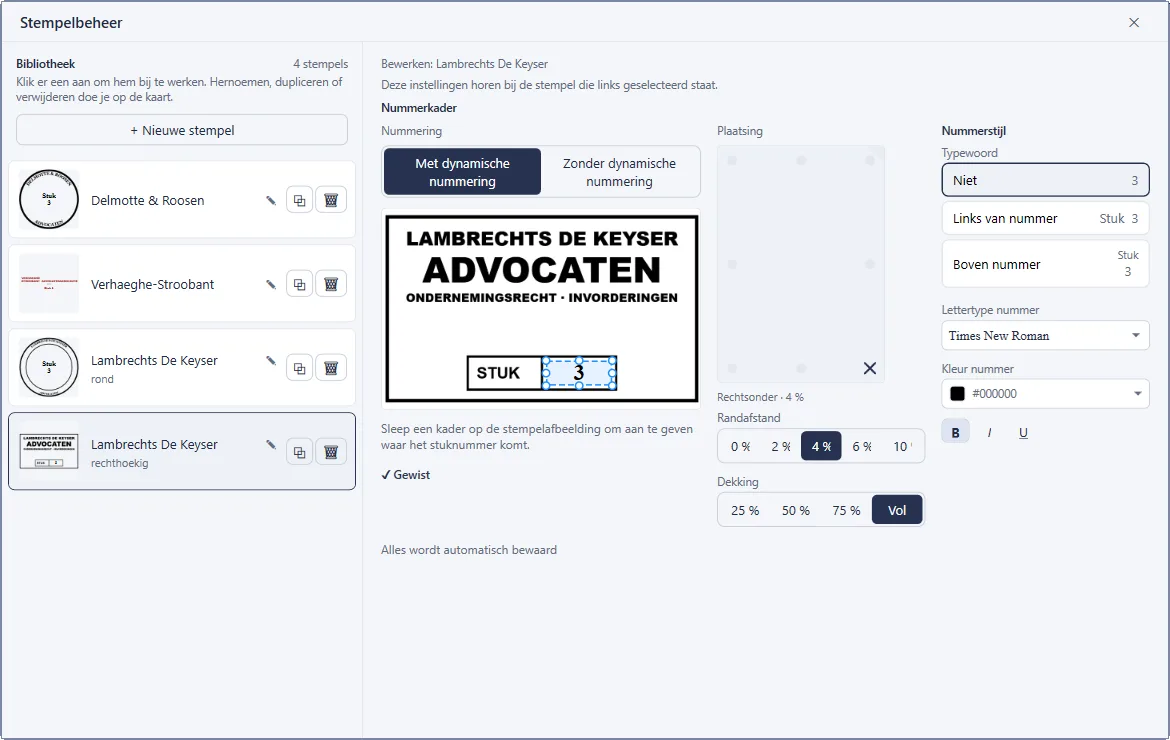
The exhibit number goes inside the stamp, the way you would write it by hand: you drag one frame over the number already on the scan, and CourtMerge erases that number and centres the new one in the same place.
 Enlarge
What if that corner of the page is already taken?
Then the stamp moves. CourtMerge checks, page by page, whether the chosen corner already carries something, such as text, a signature or another firm's stamp, and then tries the remaining seven placements clockwise, if you allow it. The preview before generating says where the stamp ended up, and why.
That judgement is calibrated against 879 real filed exhibits. The corner holding the page label is blocked for the stamp, and the other way around.
Do I get updates?
Yes, and they are included. There is deliberately no period attached: I am not promising you twelve months of development that I then have to deliver, and I am not putting a clock on your licence. For as long as improvements appear, you can download them.
What may happen one day is a next major version that costs money. I would rather say that now than in two years. Your current version keeps working in that case. You lose nothing; at most you would buy something new, if it looks worth it to you.
What if it is ever discontinued?
The version you buy keeps working. There is no activation server that can be switched off and no expiry date that passes. Even if no update ever appears again, your bundle still builds tomorrow.
Is this allowed on a managed office PC?
Yes. Besides the installer there is a portable version: one exe that runs without installation and without admin rights. You put it on your desktop or on a network drive and start it.
What computers does this run on?
CourtMerge is a program for Windows. On a phone, tablet or Mac you can download the file, but you cannot open it. You need Windows 10 or later, 64-bit. You don't need to install anything else: .NET is inside the program itself.
My browser and Windows show a warning.
That is expected, and there are two of them. CourtMerge does not carry a code signing certificate, so neither program can check the publisher. They are about how well known the file is, not about what is in it.
At the download, your browser warns that the file isn't commonly downloaded and that the publisher is Unknown. Choose Keep anyway there. In Edge that choice sits under the arrow next to Delete.
When you open it, Microsoft Defender SmartScreen shows Windows protected your PC. Click More info and then Run anyway. Windows remembers this for this file; a later version brings both messages back.
Do I get an invoice?
Yes, directly from Joachim Ally, trading as Ronagold, as soon as your order is complete. No VAT is charged, under Belgium's small-business exemption scheme. Order as a business and you get the invoice electronically via Peppol.
How do I receive my licence?
By email, in two ways at once: as a .cmlic file attached and as a
block of text in the message itself. You paste that block into the app.
Handy when your firm's mail filter strips attachments. The same file or
block also turns on CourtMerge Pro in the web tool.
Start free, get Pro when you need it
Make your next bundle in the web tool. Your licence later unlocks that same tool.