CourtMerge Pro for Windows
The Windows app is the part of CourtMerge Pro you install, with your firm's stamp, compression and saved case files. On a phone, tablet or Mac you can download the file, but you cannot open it; there you make your bundle in the free web tool.
You download the complete app. Without a licence, three case files are free; with your CourtMerge Pro licence everything works. No account, no email address, no card number.
Version 1.6.1 · released on 11 November 2026 · installer 63.0 MB · portable zip 92.6 MB
Your browser and Windows warn you
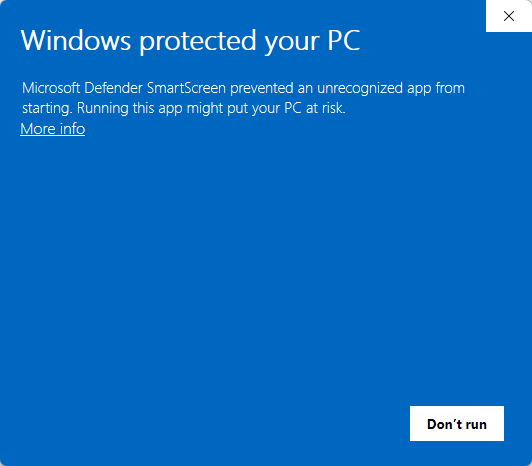
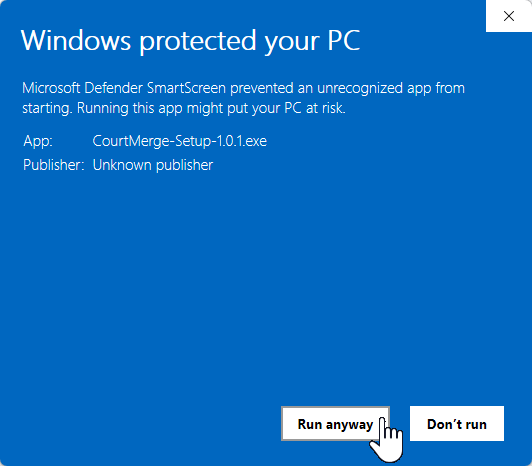
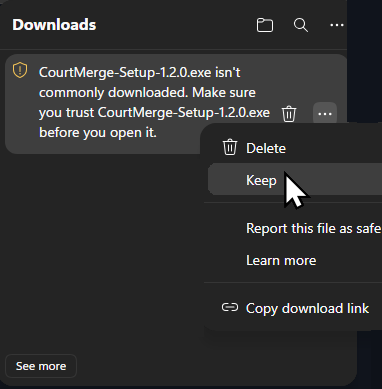
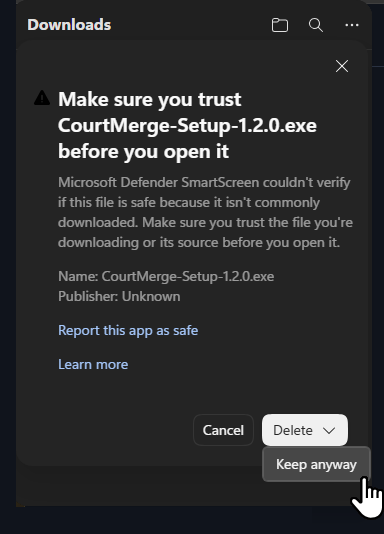
You get two warnings in a row: first from your browser as the file comes down, then from Windows when you open it. CourtMerge does not carry a code signing certificate yet, and without one neither program can check who publishes the file. So both report the publisher as unknown. That is about how well known the file is, not about what is in it. If such a certificate is added later, both warnings disappear on their own.
This message comes from your browser, right at the download. The file isn't commonly downloaded and the publisher is Unknown. Click ⋯ next to the file and choose Keep; the browser then asks you to confirm once more — choose Keep anyway there.
This message comes from Windows itself, when you open the downloaded file. Windows shows it because the file is not known yet. Click More info and then Run anyway.